


Finger Typhoon
The application where students would easily get knowledge
experiencing principles of typhoon through multiple simulations
UX/UI | Tablet | APR 2014 - SEP 2014
🏆 KIDS Excellence Award - HCI KOREA 2014
Different from a simple and boring science study, Finger Typhoon is an immersive educational application where students can create and control typhoons with their own hands.
Through interactive infographics and short quizzes, users learn the entire lifecycle of a typhoon — from formation to dissipation — and gain deeper scientific insight through simulation and experimentation.
Timeline : April 2014 - September 2014
Type : Educational Science Application (Tablet)
Award: KIDS Excellence Award – HCI KOREA 2014
Team: 2 members (Collaborative project)
Role: UX/UI Designer & Interaction Design Lead
Tools : Photoshop, Illustrator
Main Tasks:
-
UX structure & information architecture
-
Layout and visual system design
-
Interaction prototype and usability testing
-
Collaborative ideation and content structure planning
Team Collaboration
This project was developed collaboratively by two designers:
-
Avigail Kim (UX/UI Lead): Responsible for user flow, interaction design, and visual direction.
-
Teammate (Content/Media Designer): Focused on motion graphics, scientific content research, and data visualization.
Together, they combined UX research and visual storytelling to build an educational experience that feels intuitive and immersive for middle school learners.
Problem & Objective
Problem:
Students were losing opportunities to think critically due to memorization-heavy education. Teachers lacked the experiential tools to make science engaging.
Objective:
To help students learn about typhoons effectively and autonomously through exploration, visualization, and direct manipulation.
Core Features
-
Interactive Learning Flow
-
Step-by-step typhoon formation explanation using infographics.
-
Real historical typhoon data visualization (path, damage, casualties).
-
Review quizzes and self-assessment functions.
-
-
Simulation Mode
-
Users can create virtual typhoons by setting environmental conditions (temperature, humidity, pressure).
-
Real-time feedback on typhoon strength and trajectory.
-
Comparison with past major typhoons (Haiyan, Delta, etc.).
-
-
Data-Based Learning
-
Historical storm database accessible within the app.
-
Visual overlay maps show storm paths and damages.
-
Students analyze results of their simulations against actual data.
-

User Experience (UX Strategy)
1. Learning Framework: “3H” Principle
-
Head: Thinking and reasoning
-
Hands: Experimenting and interacting
-
Heart: Enjoying and empathizing through experience
2. Real Classroom Integration
Photos show students actively engaging with the app — discussing, experimenting, and recording results collaboratively.
→ Encourages curiosity and teamwork in science education.
3. Problem-Solving Flow
Students approach problems through three stages:
-
What can I do? (Physical actions / observations)
-
What should I do? (Choice of method)
-
What is the essence? (Understanding underlying principles)
4. Cognitive Approach
Through structured exploration, students learn:
-
To reason scientifically
-
To validate hypotheses
-
To connect data with physical phenomena
(They learn to solve problems through formal reasoning and express their understanding with scientific rigor.)


Information Architecture
Main Sections
-
Typhoon Learning
-
How typhoons form
-
Movement patterns
-
Damage impact
-
Dissipation process
-
-
Typhoon Simulation
-
Create your own typhoon
-
Experiment with variables
-
Compare with real typhoons
-
Save and review results
-
-
Typhoon Encyclopedia
-
Global and regional typhoon records
-
Path maps, max speed, damage statistics
-

Interaction Flow
Home → Learn About Typhoon → Simulation Mode
├── Select Typhoon / Create New
├── Run Experiment (Temperature, Wind, Pressure)
├── Observe → Compare Results
├── Save Typhoon → Review in Notes
Wireframe & Interaction Design

1. Start Screen
-
Two learning paths:
Typhoon Learning (theory) | Typhoon Simulation (practice)
2. Learning Mode
-
Step-based modules covering formation → movement → dissipation
-
Drag-and-drop vocabulary for active learning
-
Infographics summarize key principles
3. Simulation Mode
-
Users set typhoon parameters and observe real-time reactions
-
Experiments guide problem-solving via hints and challenges
-
Dynamic UI with map-based visualization
4. Experiment Mode
-
Students test cause-and-effect relationships (e.g., sea temperature ↑ → wind speed ↑).
-
Incorrect setups trigger contextual hints to reattempt.
-
Allows exploration beyond textbook limits.
5. Save & Compare
-
Students can name and save their typhoon after 5+ successful experiments.
-
Saved typhoons appear as experiment notes for later review.
-
Compare with real historical typhoons such as Haiyan, Nari, or Megi.
Key Takeaways

-
Transformed passive learning into active exploration.
-
Combined scientific accuracy with interactive storytelling.
-
Reinforced Korea’s early smart education initiative.
-
Encouraged creativity and curiosity in STEM learning.
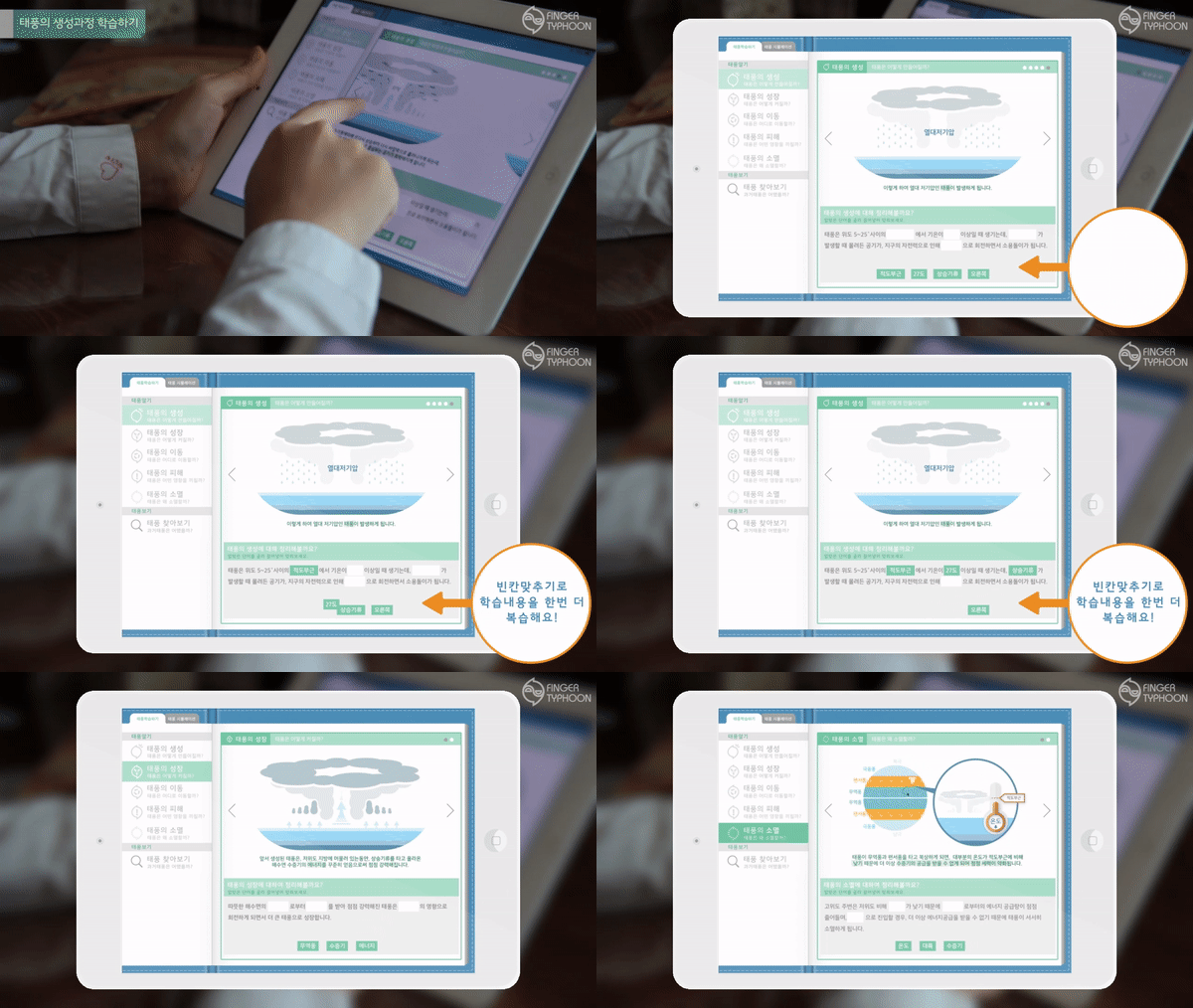
The process from typhoon generation to extinction is studied by the infographic and the content of the course is reviewed through the cleanup section at the bottom.
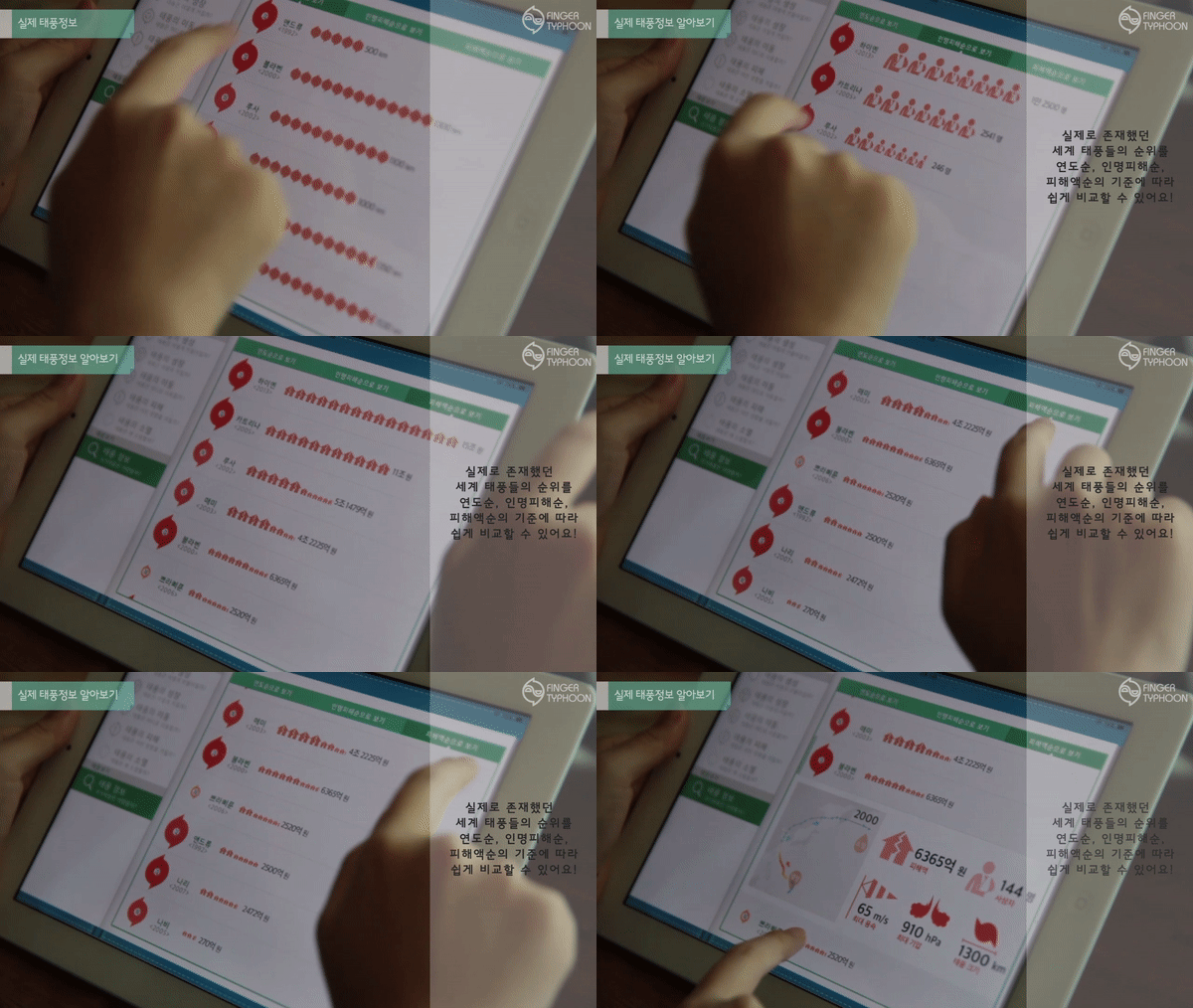
Typhoon information is provided based on historical data, number of casualties and the amount of damage caused by the nine major typhoons.
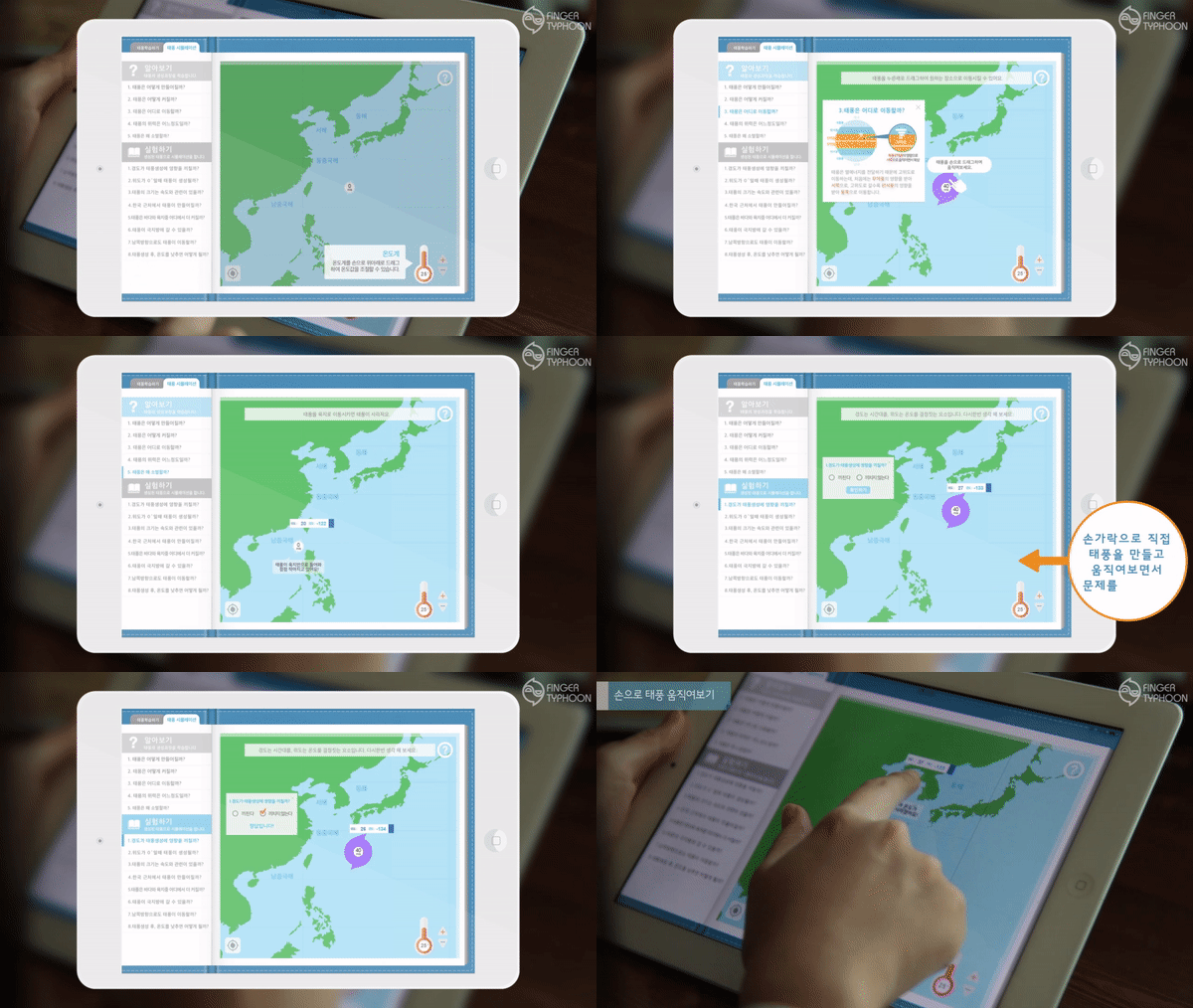
Typhoon Simulation > Learning | This is a review of typhoon learning. The process of typhoon occurrence is simply provided in five stages.
Typhoon Simulation > Experiment | This is a stage imitating a typhoon that has occurred. By answering eight questions, you get to know the typhoon information directly.
Outcome


-
Recognized for innovation in interactive education design (HCI Korea 2014).
-
Prototype was used in multiple middle school classrooms for testing.
-
Improved comprehension and engagement metrics in pilot studies.